iblai-analytics
Compare original and translation side by side
🇺🇸
Original
English🇨🇳
Translation
Chinese/iblai-analytics
/iblai-analytics
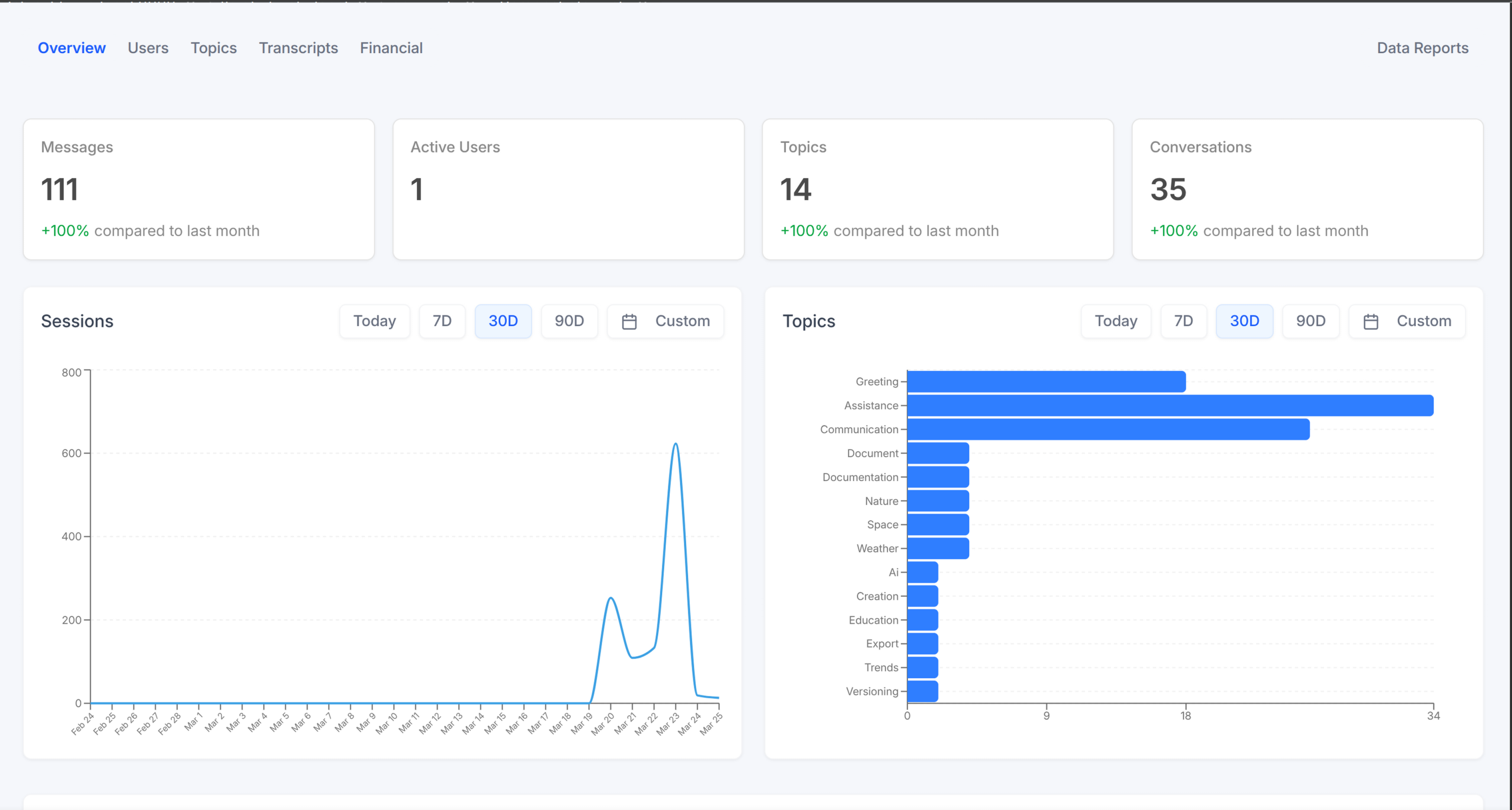
Add an analytics dashboard page with usage metrics, conversation stats,
and user activity. Supports a simple overview or a full tabbed layout with
Users, Topics, Financial, Transcripts, and Reports.
AI Assistant: Do NOT add custom styles, colors, or CSS overrides to ibl.ai SDK components. They ship with their own styling. Keep the components as-is. Do NOT implement dark mode unless the user explicitly asks for it.When building custom UI around SDK components, use the ibl.ai brand:
- Primary:
, Gradient:#0058cclinear-gradient(135deg, #00b0ef, #0058cc)- Button:
bg-gradient-to-r from-[#2563EB] to-[#93C5FD] text-white- Font: System sans-serif stack, Style: shadcn/ui new-york variant
- Use shadcn components for custom UI -- they share the same Tailwind theme and render in ibl.ai brand colors automatically.
You MUST runbefore telling the user the work is ready./iblai-test
添加一个包含使用指标、会话统计和用户活动的分析仪表板页面。支持简单概览,或包含用户、主题、财务、对话记录、报告的完整标签页布局。
AI Assistant: 请勿为ibl.ai SDK组件添加自定义样式、颜色或CSS覆盖,它们自带样式,请保持组件原样。除非用户明确要求,否则不要实现暗色模式。围绕SDK组件构建自定义UI时,请遵循ibl.ai品牌规范:
- 主色:
, 渐变:#0058cclinear-gradient(135deg, #00b0ef, #0058cc)- 按钮:
bg-gradient-to-r from-[#2563EB] to-[#93C5FD] text-white- 字体: 系统无衬线字体栈, 样式: shadcn/ui new-york变体
- 自定义UI使用shadcn组件——它们共用相同的Tailwind主题,会自动适配ibl.ai品牌色渲染。
告知用户工作完成前,你必须运行。/iblai-test
Prerequisites
前置条件
- Auth must be set up first ()
/iblai-auth - MCP and skills must be set up:
iblai add mcp
- 必须先完成认证配置()
/iblai-auth - 必须完成MCP和技能配置:
iblai add mcp
Step 0: Check for CLI Updates
步骤0:检查CLI更新
AI Assistant: Before running anycommand, check for updates. Runiblaito get the current version, then check the latest:iblai --version
- PyPI:
curl -sf https://pypi.org/pypi/iblai-app-cli/json | python3 -c "import sys,json; print(json.load(sys.stdin)['info']['version'])"- npm:
npm view @iblai/cli version 2>/dev/null- GitHub (binary installs):
curl -sf https://api.github.com/repos/iblai/iblai-app-cli/releases/latest | python3 -c "import sys,json; print(json.load(sys.stdin)['tag_name'].lstrip('v'))"If a newer version exists, update:
- pip:
pip install --upgrade iblai-app-cli- npm:
npm install -g @iblai/cli@latest- Binary: download the latest release from
for the current platform and replace the binaryhttps://github.com/iblai/iblai-app-cli/releases/latest
AI Assistant: 运行任何命令前,请先检查更新。 运行iblai获取当前版本,然后查询最新版本:iblai --version
- PyPI:
curl -sf https://pypi.org/pypi/iblai-app-cli/json | python3 -c "import sys,json; print(json.load(sys.stdin)['info']['version'])"- npm:
npm view @iblai/cli version 2>/dev/null- GitHub(二进制安装):
curl -sf https://api.github.com/repos/iblai/iblai-app-cli/releases/latest | python3 -c "import sys,json; print(json.load(sys.stdin)['tag_name'].lstrip('v'))"如果存在更新版本,请升级:
- pip:
pip install --upgrade iblai-app-cli- npm:
npm install -g @iblai/cli@latest- 二进制版本:从
下载对应平台的最新版本,替换原有二进制文件即可https://github.com/iblai/iblai-app-cli/releases/latest
Step 1: Run the Generator
步骤1:运行生成器
bash
iblai add analyticsbash
iblai add analyticsWhat Was Generated
生成的文件内容
| File | Purpose |
|---|---|
| Analytics dashboard page with |
The page reads / from localStorage and renders
the analytics overview for the current tenant.
tenantcurrent_tenant| 文件 | 用途 |
|---|---|
| 包含 |
该页面会从localStorage读取/,并渲染当前租户的分析概览。
tenantcurrent_tenantStep 2: Use MCP Tools for Customization
步骤2:使用MCP工具自定义
get_component_info("AnalyticsOverview")get_component_info("AnalyticsOverview")<AnalyticsOverview>
Props
<AnalyticsOverview><AnalyticsOverview>
属性
<AnalyticsOverview>| Prop | Type | Description |
|---|---|---|
| | Tenant/org key |
| | Mentor UUID. Pass |
| | Filter analytics to a specific mentor |
| | Filter analytics to specific user groups |
| 属性 | 类型 | 说明 |
|---|---|---|
| | 租户/组织密钥 |
| | Mentor UUID。传入 |
| | 按指定mentor筛选分析数据 |
| | 按指定用户组筛选分析数据 |
Step 3: Verify
步骤3:验证
Run before telling the user the work is ready:
/iblai-test- -- must pass with zero errors
npm run build - -- vitest must pass
npm run test - Start dev server and touch test:
bash
npm run dev &
npx playwright screenshot http://localhost:3000/analytics /tmp/analytics.png
告知用户工作完成前请运行:
/iblai-test- -- 必须零错误通过
npm run build - -- vitest必须通过
npm run test - 启动开发服务器并进行触摸测试:
bash
npm run dev &
npx playwright screenshot http://localhost:3000/analytics /tmp/analytics.png
Important Notes
重要注意事项
- Import: -- analytics components are framework-agnostic
@iblai/iblai-js/web-containers - Redux store: Must include and
mentorReducermentorMiddleware - : 5 args (v1.2+)
initializeDataLayer() - : Deduplicated via webpack aliases in
@reduxjs/toolkitnext.config.ts - empty string: For org-wide analytics pass
mentorIdnot""undefined - Brand guidelines: BRAND.md
- 导入路径: -- 分析组件是框架无关的
@iblai/iblai-js/web-containers - Redux store: 必须包含和
mentorReducermentorMiddleware - : 需传入5个参数(v1.2+版本)
initializeDataLayer() - : 通过
@reduxjs/toolkit中的webpack别名实现去重next.config.ts - 空字符串: 查看全组织分析数据时请传入
mentorId而非""undefined - 品牌规范: BRAND.md