how-to-deploy-pocketbase-to-cloud-run
Compare original and translation side by side
🇺🇸
Original
English🇨🇳
Translation
ChineseHow to Deploy PocketBase to Cloud Run
如何将PocketBase部署到Cloud Run
It is now possible to run PocketBase on Google CloudRun because of the recent support for mounting volumes. This is a guide on how to deploy PocketBase on Google Cloud Run.
Features
特性
- Scale to zero
- Infinite storage (and file deletion protection, file versions, and multi region)
- /
pb_data/pb_publicall in the same file systempb_hooks - Backups can be done either by PocketBase or by protecting the bucket
- 零缩放
- 无限存储(以及文件删除保护、文件版本和多区域支持)
- /
pb_data/pb_public全部位于同一文件系统中pb_hooks - 可通过PocketBase或存储桶保护功能进行备份
Prerequisites
前提条件
- Google Cloud project
- Google Cloud Storage bucket
- Google Cloud项目
- Google Cloud Storage存储桶
Getting Started
开始使用
Fork this repository or click "Use this template" to create your own repository.
复刻此仓库或点击“Use this template”创建你自己的仓库。
Steps
步骤
Create a new service
创建新服务
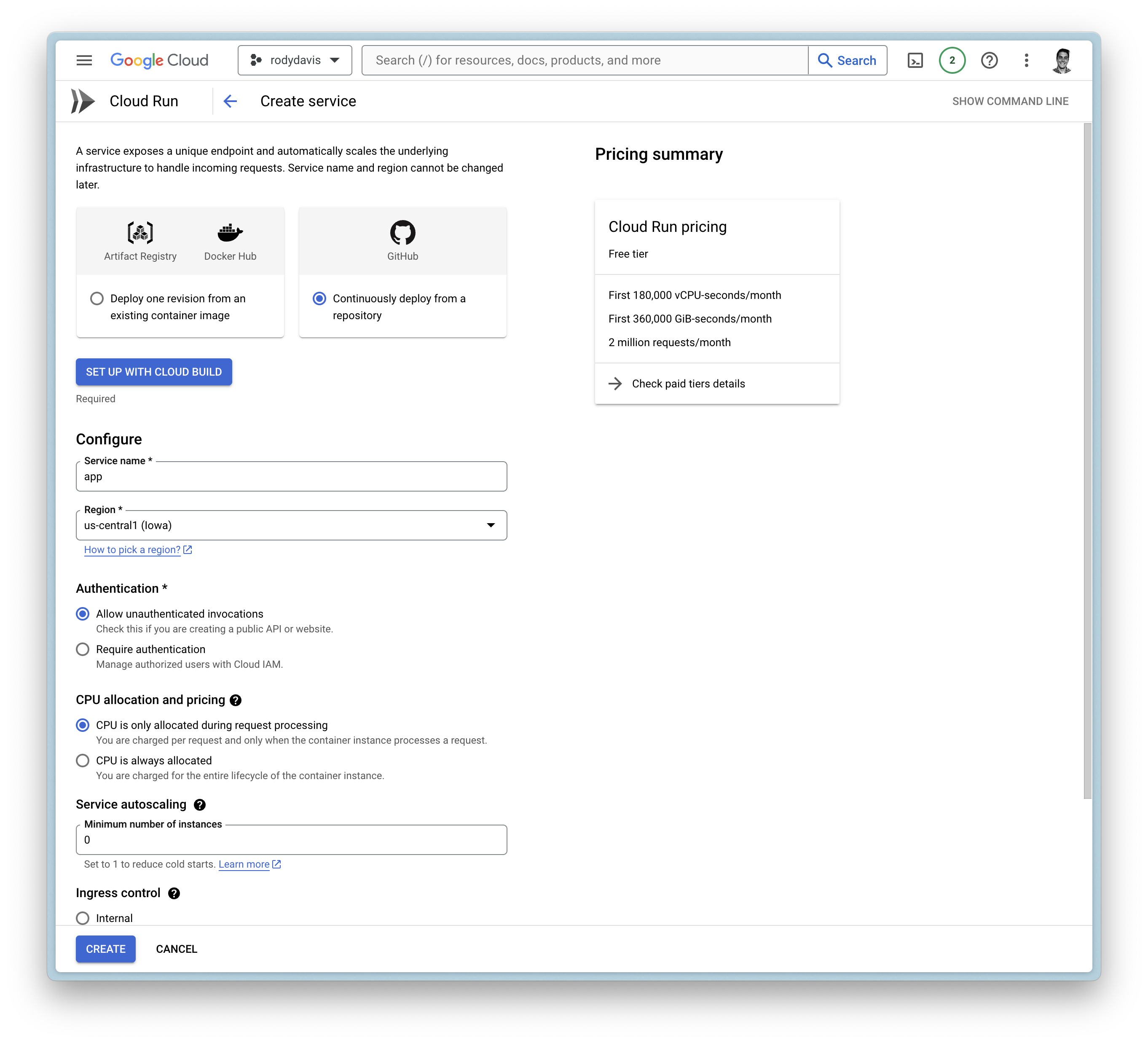
Google Cloud Build
Google Cloud Build
- Setup with Cloud Build
- Repository Provider:
GitHub - Select Repository:
THIS_REPOSITORY_FORK
- Repository Provider:
- Branch:
main - Build Configuration:
Dockerfile
- 使用Cloud Build进行设置
- 仓库提供商:
GitHub - 选择仓库:
THIS_REPOSITORY_FORK
- 仓库提供商:
- 分支:
main - 构建配置:
Dockerfile
General Settings
常规设置
- Allow unauthenticated invocations
- CPU is only allocated when the service is handling requests
- Maximum number of requests per container is set to
1000 - Maximum number of containers is set to
1 - Timeout is set to
3600 - Ingress is set to internal and traffic
all
- 允许未认证调用
- 仅当服务处理请求时才分配CPU
- 每个容器的最大请求数设置为
1000 - 最大容器数设置为
1 - 超时时间设置为
3600 - 入口设置为内部和流量
all
Container(s), Volumes, Networking, Security
容器、卷、网络、安全
Volumes
卷
- Add volume
- Volume type:
Google Storage bucket - Volume name:
remote-storage (or any name you want) - Bucket:
YOUR_BUCKET_NAME - Read-only:
false
- Volume type:
- 添加卷
- 卷类型:
Google Storage bucket - 卷名称:
remote-storage(或你想要的任何名称) - 存储桶:
YOUR_BUCKET_NAME - 只读:
false
- 卷类型:
Container(s)
容器
- Startup CPU boost is
enabled - Volume mount (s)
- Volume name:
remote-storage - Mount path:
/cloud/storage
- Volume name:
- 启动CPU加速已
启用 - 卷挂载
- 卷名称:
remote-storage - 挂载路径:
/cloud/storage
- 卷名称:
Add Health Checks
添加健康检查
You can add a health check to your service that uses Pocketbase's health check endpoint .
/api/health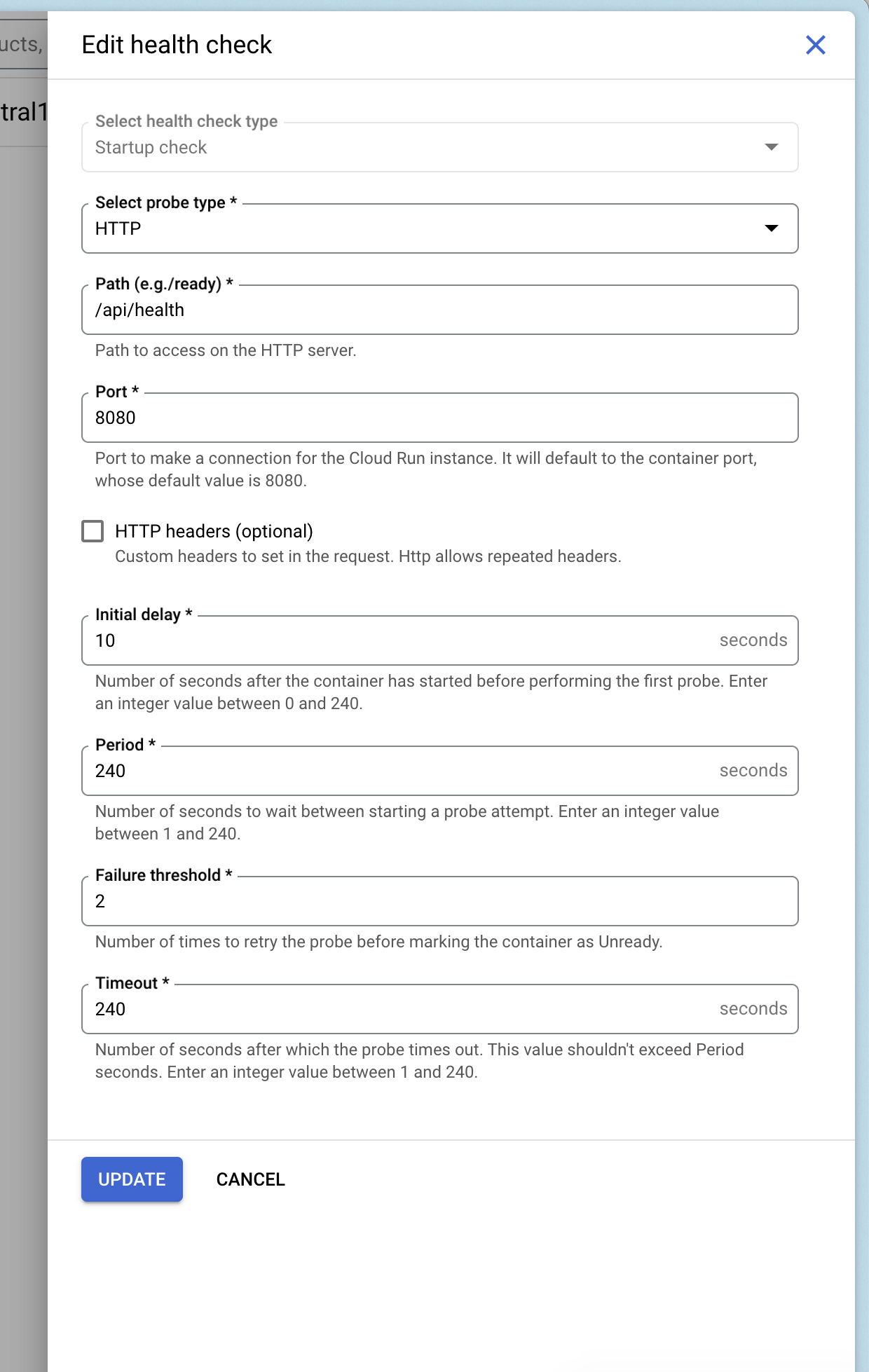
你可以为服务添加健康检查,使用Pocketbase的健康检查端点。
/api/healthDeploy and Wait
部署并等待
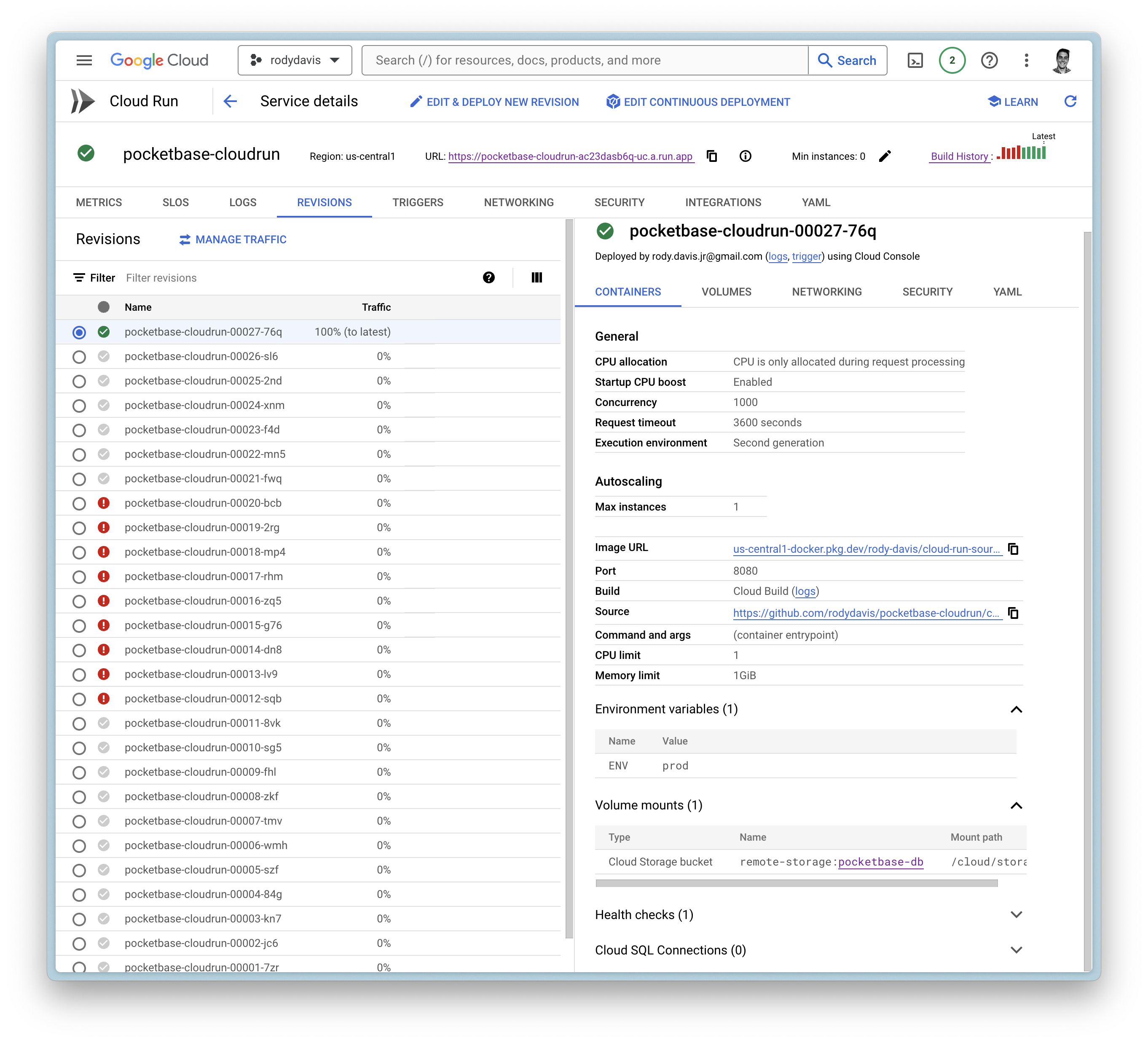
Now create the service and wait for the cloud build to finish.
If everything goes well, you should see the service deployed.
现在创建服务并等待Cloud Build完成。
如果一切顺利,你会看到服务已部署。
FAQ
常见问题
What if I have local files that I want to use?
如果我有本地文件想要使用怎么办?
pb_datapb_publicpb_hooksYou can upload these directories to your Google Cloud Storage bucket you created earlier to the root directory.
pb_datapb_publicpb_hooks你可以将这些目录上传到之前创建的Google Cloud Storage存储桶的根目录中。
Can I use a custom domain?
我可以使用自定义域名吗?
Yes, you can use a custom domain. You can follow the guide on the official documentation.
是的,你可以使用自定义域名。你可以按照官方文档中的指南进行操作。